Comparison
Zebra DS8108 vs DS8178: corded or cordless scanner?
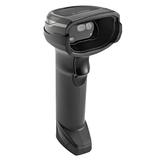
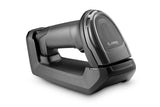
Same imager and settings, different freedom: the DS8108 is corded with a five-year warranty, the DS8178 adds Bluetooth, a swappable battery and the CR8178 cradle.
In this guide
The DS8108 and DS8178 share the same megapixel imager, read the same bar codes at the same distances and are configured the same way. The difference is the cable. Choose the DS8108 for a fixed till or desk where the scanner stays at the counter and you want the longest warranty. Choose the DS8178 when staff scan bulky items in a trolley, move around the shop floor, or need the scanner on a tablet or phone by Bluetooth.
| DS8108 | DS8178 | |
|---|---|---|
| Connection | Cable: USB, RS-232, keyboard wedge or IBM 46XX | Bluetooth 4.0 with BLE to a CR8178 cradle, which connects by the same cables; or directly to a PC, tablet or phone (HID or serial profile) |
| Wireless range | Cable length | Up to 100 m (Class 1) or 10 m (Class 2) |
| Base in our kit | Gooseneck Intellistand for hands-free scanning | CR8178-SC standard cradle (desk or wall); CR8178-PC presentation cradle available |
| Power | From the host over the cable | 2,500 mAh PowerPrecision+ Li-ion battery, or optional PowerCap capacitor |
| Scans per charge | Not applicable | Up to 65,000 (battery); about 2,000 (PowerCap) |
| Full charge from empty, on USB | Not applicable | Battery 7 h 45 min (standard USB) or 3 h (BC1.2 USB) in the CR8178-SC; PowerCap 30 min |
| Weight | 154 g | 235 g; standard cradle 202 g |
| Size (H × W × D) | 16.8 × 6.6 × 10.7 cm | Same |
| Imager | 1280 × 960 pixels, 48° × 37° field of view | Same |
| Read range, 13 mil UPC | 0–61 cm | Same |
| Sealing, drops | IP52; multiple 1.8 m drops to concrete; 2,000 tumbles of 0.5 m | Same |
| Keyboard layouts | Over 90 international keyboards | Same |
| Zebra warranty | 5 years | 3 years for scanner and cradle |
Figures from Zebra's DS8100 Series spec sheet; battery charge times from the DS8178 Product Reference Guide. Battery life and range depend on use and surroundings.
Choose the DS8108 if
- The scanner stays at one till, desk or packing bench
- Items come to the scanner, not the other way round
- You want no battery to charge or replace
- You want the five-year Zebra warranty and the lighter scanner
Choose the DS8178 if
- Cashiers scan bulky items in the customer's trolley
- You want no cable across the counter
- The scanner should work with a tablet or phone by Bluetooth
- You need extras such as the cradle's Page button, batch mode or an alarm when a scanner leaves the area
What both scanners share
Both read 1D and 2D codes on paper and on phone screens, Digimarc watermarks included, and both can capture document images. Their Quick Start Guides print the same Enter, Tab, Caps Lock and factory-default bar codes, and both PRGs list the same country keyboard types, so our DS8108 and DS8178 setup guide covers both; only the place of each setting in the DS8108 and DS8178 Product Reference Guides differs. Both are configured with Zebra's free 123Scan utility.
Video: Zebra Technologies
What the DS8178 adds
- Two cradles. The CR8178-SC standard cradle in our kit sits on the desk or mounts on a wall. The CR8178-PC presentation cradle holds the scanner upright for hands-free scanning. Zebra states that both also serve the DS4678.
- Swappable power. The battery and the PowerCap swap on site, and a power gauge on the scanner shows the charge. A spare battery (BTRY-DS81EAB0E-00) keeps a scanner running across shifts.
- Virtual Tether and paging. The scanner can warn when it leaves the radio range or stays out of the cradle too long (off by default), and the cradle's Page button makes a lost scanner beep.
- Wi-Fi Friendly Mode. Can keep the scanner's Bluetooth off the Wi-Fi channels you select (off by default).
- Several scanners per cradle. Up to seven DS8178 can share one cradle once you switch it to Multipoint-to-Point mode.
The cradle runs on USB power from the PC; an optional 12 V power supply charges fastest. If something goes wrong later, our troubleshooting guide covers both models. Compare both in our shop: DS8108 and DS8178, and see all guides for the DS8108 and DS8178.
Frequently asked questions
Does the DS8178 scan better than the DS8108?
No. Both use the same 1280 × 960 imager and Zebra quotes the same read ranges. The DS8178 adds Bluetooth and a battery.
Can the DS8178 work without its cradle?
Yes. It can pair directly with a PC, tablet or phone as a Bluetooth keyboard. It still needs the cradle to charge.
How long does the DS8178 battery last?
Zebra quotes up to 65,000 scans per full charge with the 2,500 mAh PowerPrecision+ battery.
Can the DS8108 scan hands-free?
Yes. Our DS8108 kit includes the Gooseneck Intellistand. In the stand the scanner reads any bar code you hold in front of it.
Was this guide helpful?
More DS8108 guides
Related guides
Still stuck?
Contact support
Send us your model and a short description of the problem. Our team will help you find a solution.