Barcode Scanner Interface: USB HID vs COM vs RS-232 vs Bluetooth
Most barcode scanner support calls we get are not about broken hardware. The scanner reads the code perfectly, but the wrong barcode scanner interface is selected, so the software sees nothing, sees the wrong characters, or loses the scan when someone clicks another window. Choosing between USB HID, USB COM, RS-232 and Bluetooth takes two minutes once you know what your software expects. This guide explains each option and which one to order.
Which barcode scanner interface should you order?
| Your situation | Interface to use | Order this |
|---|---|---|
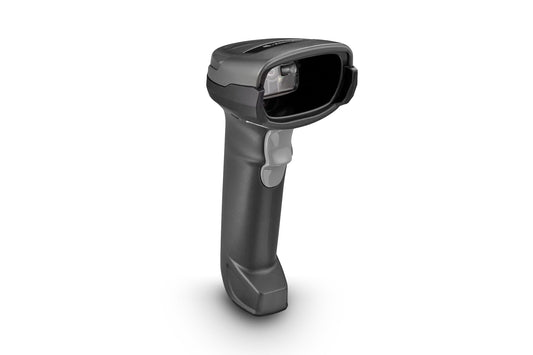
| Web POS, Shopify POS, ERP or Excel on a Windows PC, scans go into a text field | USB HID keyboard | Zebra DS2208 (DS2208-SR7U2100SGW) |
| Software settings ask for a COM port number | USB COM port emulation | Honeywell Voyager 1470g (1470G2D-2USB-EU) |
| Older POS terminal or industrial controller with a 9-pin serial port | RS-232 | Zebra DS2208 with RS-232 cable CBA-R01-S07PBR |
| Cordless at a fixed counter PC | Bluetooth through a cradle, cradle on USB | Zebra DS2278 (DS2278-SR00007ZZWW) with cradle CR2278-PC10004WW |
| Tablet or phone POS, no PC | Bluetooth HID, paired directly | Zebra DS2278, no cradle needed |
| Warehouse, scanning far from the PC | Bluetooth through a cradle | Zebra DS8178 (DS8178-SR0F007ZZWW) |
The interface is mostly a setting, not a hardware choice. A DS2208 or a Voyager 1470g can run as a keyboard today and as a COM port tomorrow after scanning one programming barcode. What you do have to get right at purchase is the cable (USB or RS-232) and, for cordless scanners, whether you need a cradle.
USB HID keyboard: why is it the default, and when does it fail?
In USB HID keyboard mode the scanner tells the computer it is a keyboard. Every scan is typed, character by character, into whatever field has the cursor, usually followed by Enter. No driver, no setup, works on Windows, macOS, Linux, Android and iPadOS. This is why nearly every scanner ships in this mode and why it is the right choice for most shops.
It fails in three predictable ways:
- Wrong characters. The scanner sends key positions, not letters. If the PC uses a Czech, German or French layout and the scanner assumes US, digits come out as accented letters (on a Czech layout the top row gives ě, š, č instead of 2, 3, 4) and Y and Z swap. Fix it by setting the scanner's keyboard country to match the PC, or by switching the PC layout. The standard Lithuanian layout does the same, with ą, č, ę on the number row. Estonian, Latvian and Polish programmer layouts keep digits in the US positions, so the problem is rarer there, but letters with diacritics in a QR code can still break.
- Lost focus. If a pop-up steals the cursor, the scan is typed into the wrong window or nowhere. For a busy till this is an annoyance; for a warehouse booking stock it is a data error.
- Control characters. GS1 DataMatrix and GS1-128 codes contain an invisible group separator between fields. A keyboard has no key for it, so it is often dropped or mapped to something your software does not expect. If you parse GS1 codes for batch and expiry, test this before you roll out.
USB COM port emulation: when does your software need it?
In COM mode the scanner appears in Windows Device Manager as a serial port, for example COM5. The software opens that port and receives each scan as one complete message, regardless of which window is active and regardless of keyboard layout. Older accounting and warehouse programs, scale software and many custom scripts work this way. Some, like the Czech POHODA configuration sheets for Honeywell scanners, offer both USB keyboard and USB serial emulation and let you choose.
| Brand | Keyboard mode name | COM mode name | POS driver mode |
|---|---|---|---|
| Zebra (DS2208, DS2278, DS8178) | USB Keyboard (HID) | CDC COM Port Emulation | IBM Hand-Held USB, OPOS, SNAPI |
| Honeywell (Voyager, Xenon, Granit) | USB Keyboard (PC), terminal ID 124 | USB COM Port Emulation, terminal ID 130 | USB HID POS, terminal ID 131 |
| Datalogic (QuickScan, Gryphon) | USB-KBD | USB-COM-STD | USB-OEM |
Windows 10 and 11 load a generic driver for most CDC COM devices. Zebra and Honeywell also publish their own COM drivers, and some older programs only see the port once the manufacturer driver is installed. Two habits save hours: write down the COM number Windows assigns, and plug the scanner into the same USB socket every time, because a different socket can give a different number.
The POS driver modes (OPOS, SNAPI, Honeywell HID POS) are for software that talks to the scanner through a vendor driver or SDK, typically larger retail POS systems and Zebra's 123Scan tool. If your POS supplier has not asked for one of these, you do not need it.
Is RS-232 still worth buying in 2026?
Only if the host has a serial port and nothing else will do. Typical cases: older Wincor Nixdorf BEETLE tills, industrial controllers, weighing and labelling stations, and lab instruments. RS-232 has two catches that USB does not:
- Power. A standard PC serial port does not power the scanner. You either need a separate power supply or a host that supplies 5 V on the cable, which is why Zebra sells dedicated cables such as the Nixdorf BEETLE 5 V cable.
- Matching settings. Baud rate, data bits, parity and stop bits on the scanner must match the host exactly. Defaults differ between brands, so take the values from the host documentation and scan the matching codes from the scanner's programming guide.
If the host is a modern PC and only the old software expects a serial port, use USB COM emulation instead. It gives the software its COM port without any of the wiring.
Bluetooth: cradle or direct pairing?
A cordless scanner can talk to its host in two quite different ways, and mixing them up is the commonest Bluetooth complaint.
| Setup | What the host sees | Good for | Watch out for |
|---|---|---|---|
| Scanner paired to its cradle, cradle on USB | A normal USB scanner (HID or COM, as configured) | Counter PCs, warehouse PCs, anywhere a cable already worked | The cradle is the radio, so range is measured from the cradle, not the PC |
| Scanner paired directly as Bluetooth HID | A Bluetooth keyboard | Tablets and phones running a POS app | iPadOS and Android may hide the on-screen keyboard while a Bluetooth keyboard is connected |
| Scanner paired directly as Bluetooth SPP (serial) | A Bluetooth serial port | Android apps written to read serial data | Only works if the app supports it; not offered on every model |
The cradle route is the most reliable for a PC because the software never knows the scanner is cordless. The Zebra DS2278 quick start guide covers both cradle pairing and direct HID Bluetooth Classic pairing. Range is the other decision: the DS2278 is built for a counter, while the DS8178 is the one to choose when people walk across a store room or loading area, with Zebra quoting up to 100 metres line of sight. Shelving, freezer doors and metal racks shorten that a lot.
What goes wrong at installation, and how do you check it?
- Open Notepad and scan. If the code appears correctly with a line break, the scanner is in keyboard mode and working. If nothing appears, it is probably in COM or POS mode.
- Check Device Manager. Under Keyboards it is HID; under Ports (COM and LPT) it is COM emulation. If it shows a yellow warning, install the manufacturer driver.
- Scan a code with letters. If Y and Z swap or digits turn into accents, fix the keyboard country setting.
- Scan a GS1 code and inspect the output. If the fields run together, the separator is being lost in keyboard mode.
- Reset before reprogramming. Scan the factory default barcode first, then the interface code, then the suffix code. Half-configured scanners cause most mystery faults.
Common questions
Is USB HID the same as a keyboard wedge?
For practical purposes yes. Keyboard wedge originally meant a scanner cabled between the keyboard and the PC; USB HID keyboard mode gives the same result over a single USB cable.
Can one scanner do HID and COM?
Yes. Mainstream Zebra, Honeywell and Datalogic scanners switch between modes by scanning a programming barcode. You only buy different hardware for RS-232 (a different cable) or Bluetooth.
Why does my scanner type the wrong characters?
The scanner's keyboard country does not match the PC keyboard layout. Set them to match, or use COM mode, which ignores keyboard layout.
Do I need a driver for a USB COM scanner?
Often not on Windows 10 or 11, but install the manufacturer driver if the port does not appear or if your software cannot open it.
Will a Bluetooth scanner work with Shopify POS on an iPad?
Yes, paired directly as a Bluetooth keyboard. Expect the on-screen keyboard to be hidden while the scanner is connected; most scanners have a setting or button to toggle it.
Can I use a USB to serial adapter instead of an RS-232 scanner?
You can, but it adds a part that can fail. If the PC has USB, set the scanner to USB COM emulation and skip the adapter.
Where to go next
Pick the scanner first by what it has to read, then set the interface to match your software. Browse the full range of barcode scanners, and if your scanner needs a different cable, cradle or power supply, the barcode scanner accessories section lists the original Zebra, Honeywell and Datalogic parts by part number.
Tags:
Previous
Rugged Laptop TCO: Five-Year Cost vs a Business Laptop
Next
Receipt Printer Special Characters: Fix õ, š, ł, ř Code Pages