Courier Label Printer Shortlist: Which Labels to Order
A parcel label that will not scan at the depot comes back as a failed collection, and the cause is nearly always the media rather than the printer. Either the roll is the wrong size for the carrier's template, or the printer physically cannot take a 102 mm wide label, or the label was printed on economy paper and then spent two days against a damp pallet. Every courier operating across the Baltics, the Nordics, Poland and Czechia expects the same basic format, so the decision is narrower than most despatch desks assume.
This is a courier label printer shortlist by scenario: what to order at a given parcel volume, which media goes with it, and which printers to rule out before you raise a purchase order.
Which courier label printer should you order for your volume?
| Your situation | Order this |
|---|---|
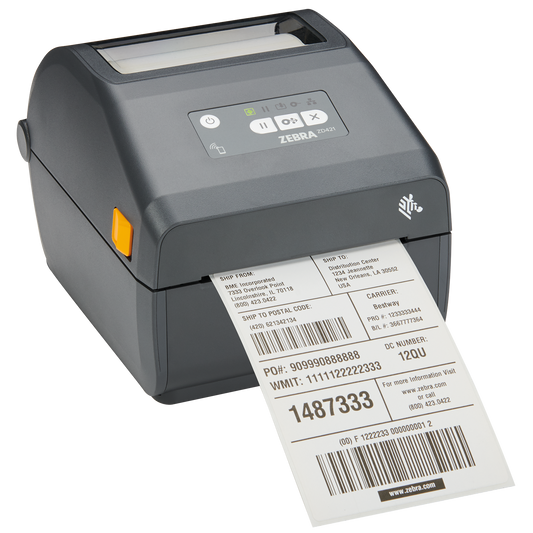
| Under 50 parcels a day, one despatch desk, USB to a PC | Zebra ZD230d (ZD23042-D0EC00EZ) with 102 x 152 mm direct thermal labels |
| 50 to 300 parcels a day, printer runs all shift, needs Ethernet | Zebra ZD421d (ZD4A042-D0EE00EZ) with premium coated Z-Select 2000D media |
| Despatch desk with no spare cable run, needs wireless | TSC DA220W (DA220W-A001-2102), 4 inch direct thermal with Wi-Fi |
| Labels must survive a cold store, a yard or outdoor staging | A thermal transfer model such as Zebra ZD421t plus a resin thermal transfer ribbon |
| Driver prints the label at the kerb or in the van | A 4 inch mobile label printer such as Bixolon SPP-L410 or TSC Alpha-40L, with 19 mm core media |
| Carrier template is longer than 152 mm | Z-Perform 1000D 102 x 192 mm (3009724-T) on the same 4 inch printer |
| You already own a 2 inch printer (ZD411, ZD611) | It cannot take a 102 mm label. Keep it for shelf labels and buy a 4 inch model |
Why is 102 x 152 mm the size every courier expects?
The parcel label used by Omniva, DPD, Posti, Venipak, GLS, DHL, InPost and Zasilkovna is built on the same footprint: 102 x 152 mm, which is the 4 by 6 inch format, roughly A6. Carrier label APIs and web portals output either an A6 PDF or a ZPL file sized for that footprint. Some systems describe it as 100 x 150 mm. In practice a 100 mm label and a 101.6 mm label both run on the same printer and the same guides, so do not treat the 1.6 mm as a different product.
What matters far more is that the label is a single piece of die cut media on a roll, not a sheet. Printing an A6 carrier label onto A4 sticker sheets with an office laser is the most common false economy in small despatch operations. It works until volume rises, then the cost per label and the handling time overtake a thermal printer within a few months.
Two sizes sit either side of the standard and are worth stocking deliberately. A 102 x 192 mm label suits carrier templates that carry a long return address block or a customs declaration. A 148 x 210 mm label, full A5, appears in pallet and freight work and needs an industrial label printer with a 76 mm core, not a desktop unit.
Which printers can physically take a 102 mm courier label?
This is where most wasted orders happen. The Zebra desktop range includes 2 inch and 4 inch models whose part numbers look almost identical, and the 2 inch models cannot print a parcel label at all. Zebra's own media specification puts the maximum media width at 108 mm for the ZD421 and ZD621 in direct thermal, and 57 mm for the ZD411 and ZD611. A 102 mm label will not fit the narrow models under any configuration.
| Model | Class | Takes a 102 mm label | Notes |
|---|---|---|---|
| Zebra ZD220, ZD230d | 4 inch entry | Yes | USB only on the base configuration, fine for one desk |
| Zebra ZD421d, ZD421t | 4 inch workhorse | Yes | Media up to 108 mm direct thermal, 203 or 300 dpi, modular connectivity |
| Zebra ZD621d, ZD621t | 4 inch, higher duty | Yes | Faster, display on some variants, same 127 mm roll limit |
| Zebra ZD411, ZD611 | 2 inch | No | Maximum media width 57 mm. Shelf and asset labels only |
| TSC DA220, DA220W | 4 inch entry | Yes | DA220W adds Wi-Fi, useful where no cable run exists |
| Citizen CL-E300, Bixolon XD3-40d | 4 inch entry | Yes | Sensible alternatives when Zebra lead times slip |
| Bixolon SPP-L410, TSC Alpha-40L | 4 inch mobile | Yes | Battery powered, small rolls with a 19 mm core |
For courier labels, 203 dpi is the correct resolution. A 300 dpi head costs more and adds nothing a depot scanner can use: carrier barcodes are printed at generous module widths precisely so they survive handling. Save the 300 dpi models for small pharmacy, laboratory or electronics labels where you are fitting a Data Matrix into 15 mm. The full range sits in desktop label printers if you want to compare interfaces.
Direct thermal or thermal transfer for parcel labels?
Direct thermal is the right default for courier work. There is no ribbon to buy or change, the label is in transit for days rather than years, and the cost per label is lower. The honest limit is heat, sunlight, friction and solvents. A direct thermal label left on a dashboard or pressed against a hot surface will grey over and become unreadable, and so will one dragged repeatedly across a conveyor guide.
Thermal transfer earns its ribbon cost in three cases: parcels staged outdoors or in a yard for more than a day, cold store and freezer despatch where condensation attacks uncoated paper, and any label that has to stay legible as a proof of delivery record. In those cases pair a thermal transfer printer with Z-Select 2000T paper and a wax resin ribbon, or a synthetic label and a resin ribbon if the parcel will be washed down.
| Media | Typical use | Ribbon needed | Trade off |
|---|---|---|---|
| Z-Perform 1000D, 102 x 152 mm (800284-605) | Everyday e-commerce despatch | None | Economy coating, fine for a few days in transit |
| Z-Select 2000D, 102 x 152 mm (800264-605) | High volume, perforated, 475 per roll | None | Premium coating, better scan contrast, costs more |
| Z-Select 2000T, 102 x 152 mm (3006322) | Cold store, yard, archive copies | Wax resin | Two consumables to stock instead of one |
| Z-Perform 1000D, 102 x 192 mm (3009724-T) | Long carrier templates with customs data | None | Only order once you know the template length |
| Linerless 100 mm (38-S100032-1031) | Variable length despatch labels | None | Needs a linerless platen and cutter |
Which core and roll diameter fits your printer?
This is the second most common ordering mistake, and it is invisible in a product title unless you read the numbers. Desktop printers in the Zebra ZD200, ZD400 and ZD600 families accept a maximum roll outer diameter of 127 mm, with 12.7 mm and 25.4 mm cores as standard and larger cores only via an adapter. So a 102 x 152 mm roll on a 25.4 mm core at 127 mm diameter, around 475 to 500 labels, is the largest roll a desktop unit will swallow.
Mobile printers are the opposite problem. A Bixolon SPP-L410 or a TSC Alpha-40L takes a small roll with a 19 mm core and an outer diameter under 60 mm, which is roughly 100 labels. Ordering desktop rolls for a fleet of mobile printers leaves you with media nobody can load. Check the core and the diameter on every line of the order, not just the label size. The full media range is in labels.
What actually makes a courier label fail?
In order of how often we see it: the label was scaled. A carrier PDF sized for A6 printed through a driver set to A4 with "fit to page" shrinks the barcode module width below what a depot scanner tolerates, and the label looks perfectly fine to the human eye. Always print carrier PDFs at 100 per cent, and prefer the carrier's ZPL output over PDF if the software offers it, because ZPL is rendered by the printer at native resolution.
Next: darkness set too high. Operators turn darkness up when a label looks faint, which bleeds the bars into each other and shortens printhead life. If a label is faint, the usual cause is a dirty printhead or media that does not match the printer's sensor setting, not insufficient heat.
Then: the gap or black mark sensor. Perforated rolls, continuous rolls and black mark rolls are calibrated differently. After changing media type, run the printer's media calibration once. Skipping it produces a blank label between every printed one, which quietly doubles your media cost.
Last: adhesive choice. Standard permanent acrylic adhesive holds on corrugated cardboard and most plastic mailers. It does not hold reliably on cold, damp or dusty surfaces, nor on recycled board with a heavy dust layer. For freezer despatch, specify a cold temperature adhesive rather than hoping a standard label will stay put.
Does linerless media make sense for despatch?
Linerless rolls carry no silicone backing paper, so a roll of the same diameter holds considerably more label length, and there is no liner waste to bin. For despatch that mostly means fewer roll changes and less waste handling, which matters at high volume. The cost is that it needs a printer with a linerless platen and a cutter, and the label length is cut rather than die cut, so you are committing to variable length labels. It suits operations printing a lot of short despatch and shelf labels rather than a fixed carrier template.
Common questions
Can I use 100 x 150 mm labels in a printer specified for 102 x 152 mm?
Yes. Both sit inside the same 4 inch media path and the same guides. The printer calibrates to the actual gap it finds.
Do I need 300 dpi for courier labels?
No. Carrier barcodes are designed with wide modules for exactly this reason. 203 dpi prints them cleanly and runs faster.
Will a 2 inch printer work if I shrink the carrier label?
No. Shrinking a carrier label below its specified size reduces barcode module width and the depot scanner will reject it. A 102 mm label needs a 4 inch printer.
How many labels should a roll hold?
For a desktop printer, a 127 mm diameter roll on a 25.4 mm core gives roughly 475 to 500 labels at 152 mm length. For mobile printers, expect about 100 per roll on a 19 mm core.
Is direct thermal good enough for international parcels?
For transit of a few days inside the EU, yes. For parcels staged outdoors, in a cold store, or kept as a signed record, use thermal transfer with a wax resin ribbon.
Can one printer serve several carriers?
Yes, and it should. All of these carriers use the same 102 x 152 mm footprint, so one 4 inch printer and one media line cover every label your despatch desk prints.
What to order
For most despatch desks the answer is one 4 inch direct thermal printer from label printers, a standing order of 102 x 152 mm direct thermal rolls on a 25.4 mm core, and one box of thermal transfer media kept aside for cold store or outdoor work. If a label in your operation has to survive more than transit, add a thermal transfer model and match it with a ribbon from thermal transfer ribbons rather than pushing direct thermal past what the coating can do. Check the core diameter on every media line against the printer it is destined for, and the ordering mistakes largely disappear.
Manufacturer media limits for the Zebra desktop range are published in Zebra's general media and print specifications.
Tags:
Previous
POS Receipt Printer Comparison: Epson vs Bixolon 2026
Next
Card Printer Ribbons: Which YMCKO Fits Your Printer