Zebra GK420d Replacement: Which Label Printer to Order
The Zebra GK420d and the GX420 family were the default shipping-label printers in Baltic, Nordic, Polish and Czech warehouses for well over a decade. Zebra announced the end of the GK line in 2019, the GX line followed, and the software around them has now started to move on: nShift, the shipping platform behind a large share of Baltic and Nordic courier labels, set 30 April 2025 as the end of official support for the GK420d. The printers themselves keep running, which is exactly why so many are still on the bench. This guide covers the Zebra GK420d replacement question properly: which current model maps to which legacy unit, what quietly breaks in the swap, and when leaving the old printer alone is still the right answer.
Which current printer replaces which legacy model?
Start here. The table below is the mapping we use when a customer sends us a photo of the label on the back of an old printer.
| What you have now | Order this | Why this one |
|---|---|---|
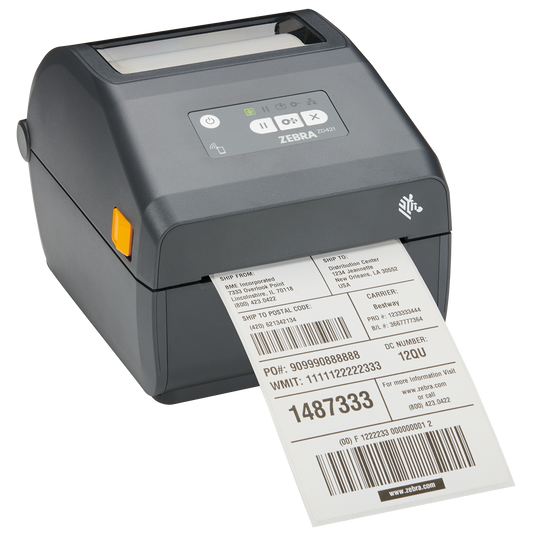
| GK420d (direct thermal, USB or serial) | Zebra ZD421d, ZD4A042-D0EX02EZ | Same 104 mm print width, same ZPL II and EPL2 languages, 152 mm/s, Bluetooth and Wi-Fi in the base unit |
| GK420t (thermal transfer, ribbon rolls) | Zebra ZD421t, ZD4A042-30EX02EZ | Takes the standard 74 m and 300 m ribbon rolls you already buy |
| GX420d or GX420t on Ethernet, serial or parallel | Zebra ZD621d, ZD6A042-D0EF00EZ | Ethernet, serial and USB are standard, not options, and it runs at 203 mm/s |
| GX430t (300 dpi, small text or 2D codes) | 300 dpi ZD421t or ZD621t, see desktop label printers | 203 dpi will visibly coarsen artwork designed at 300 dpi |
| Any GK or GX printing under 500 labels a day on USB only | Zebra ZD230d, ZD23042-D0EC00EZ | Cheapest honest like-for-like, 152 mm/s, still speaks EPL2 |
One warning on part numbers before you order. The ZD421 also comes in a ribbon cartridge version, the ZD421c, whose part numbers contain a C in the seventh character position, for example ZD4A042-C0EE00EZ. It is a good printer, but it does not take ribbon rolls at all. If your stockroom already holds a shelf of 110 mm wax ribbon, order the ZD421t and not the ZD421c.
What actually breaks when you swap a GK420 for a ZD421?
The print engine is the easy part. Four other things catch people out, and all four are cheaper to solve before the old printer is unplugged than after.
The parallel port is gone. The GK and GX printers shipped with serial, USB and a 36-pin parallel interface as standard. No current Zebra desktop printer has a parallel port. If an older ERP terminal, a labelling PC or a weighing station still drives the printer over parallel, that connection has to change to USB, Ethernet or serial, and a parallel-to-USB converter cable is not reliable for ZPL work. Plan the port first, the printer second.
Serial is standard on the ZD621, optional on the ZD421. On the ZD421 the RS-232 port is a field-installable connectivity module, not part of the base unit. If a scale, a scanner or a legacy till drives the printer over a 9-pin serial cable, either budget for the module or move up to the ZD621, where Ethernet and serial are both fitted as standard.
The old wireless radio is not compatible. GX printers with the wireless option ran 802.11b/g and Bluetooth 2.0. Current desktop models use 802.11ac and Bluetooth 4.x. That is good news for warehouse coverage, but it means a 2.4 GHz-only access point configured years ago for the old printer may need attention, and any MAC address allowlist has to be updated.
Your 38 mm core label rolls need an adapter. The GK and GX printers accepted 12.7 mm, 25.4 mm and 38 mm (1.5 in) cores directly. The ZD400 and ZD600 series take 12.7 mm and 25.4 mm cores as standard, and anything larger needs the Zebra media core adapter kit, P1079903-033, which covers 38 mm, 50 mm and 76 mm cores. Roll diameter is unchanged at 127 mm maximum, so the rolls themselves still fit. Order one adapter kit per printer if your label stock sits on wide cores.
Do your old EPL label templates still work?
Yes, and this is the part most people are pleasantly surprised by. The GK and GX printers understood ZPL II, EPL2 page mode and EPL line mode. The ZD230, ZD421 and ZD621 all still accept ZPL II and EPL2, so a template stream that has been running out of an ERP for fifteen years will very often print unchanged on the new hardware.
Two caveats. First, EPL1 line mode on the ZD621 is limited to direct thermal at 203 dpi, so a line-mode thermal transfer job needs testing rather than assuming. Second, moving from 203 dpi to 300 dpi changes the dot maths: a ZPL label designed for 203 dpi prints at roughly two thirds the physical size on a 300 dpi printer unless the template is rescaled. Keep the resolution the same during a migration unless you have a print-quality reason to change it, and change resolution as a separate, planned project.
How much does the hardware actually improve?
| Specification | GK420d / GK420t | GX420d / GX420t | ZD421 | ZD621 |
|---|---|---|---|---|
| Maximum print speed at 203 dpi | 127 mm/s | 152 mm/s | 152 mm/s | 203 mm/s |
| Resolutions | 203 dpi | 203 dpi (GX430t 300 dpi) | 203 or 300 dpi | 203 or 300 dpi |
| SDRAM | 8 MB | 8 MB | 256 MB | 256 MB |
| Flash memory | 4 MB | 4 MB | 512 MB | 512 MB |
| Standard interfaces | Serial, USB, parallel | Serial, USB, parallel | USB 2.0, USB host, Bluetooth LE | Ethernet, serial, USB 2.0, USB host |
| Media cores as standard | 12.7, 25.4, 38 mm | 12.7, 25.4, 38 mm | 12.7, 25.4 mm | 12.7, 25.4 mm |
| Print width | 104 mm | 104 mm | 104 mm | 104 mm |
| Display | None | None | None | Optional 4.3 in colour touch LCD |
The memory jump from 8 MB of SDRAM to 256 MB is not marketing. It is why the new printers hold more downloaded fonts, logos and stored formats without the template having to resend them on every label, and it is the single biggest reason a busy shipping desk feels faster after the swap even though the mechanical speed is identical on paper.
When does software stop supporting the old printer?
This is the deadline that usually forces the decision, not the printer failing. Shipping and courier platforms, ERPs and label designers each keep their own driver support list, and once a vendor drops a model, a platform update can leave a working printer unable to produce a compliant courier label. nShift published 30 April 2025 as the end of official support for the GK420d, and other vendors follow similar cycles.
The practical test: open your shipping platform, your ERP and your label designer, and check each one's supported printer list before you plan anything. If the printer appears only under a legacy or deprecated heading, you have a deadline even if nothing has broken yet. Courier label templates for Omniva, DPD, Posti, Matkahuolto, InPost and Zasilkovna are all delivered through that software layer, not by the printer, so the software vendor sets your timetable.
How do you migrate without stopping shipping?
- Print a configuration label from each old printer and photograph it. It records the firmware, the interface, the darkness setting and the print speed you are currently running.
- Buy one new printer first, not the whole fleet. Put it beside the old one on a second queue.
- Send your ten most awkward label formats to it: the courier label, the shelf label, the pallet label, anything with a 2D code, anything with a logo.
- Match the darkness setting by eye against a known-good old label, then verify barcodes with a verifier or at least a scanner at the distance the picker actually uses.
- Only then order the remaining units, and keep one old printer connected for a fortnight as a fallback.
A fleet of twelve identical printers replaced over three weeks in this order almost never causes an outage. Twelve replaced in one afternoon, on a Friday, usually does.
When is keeping the old printer the right call?
If the printer prints under 100 labels a day, is on USB, is driven by software that still lists it as supported, and the printhead is healthy, there is no technical reason to replace it this year. A GK420d printhead is still available as a spare part, and a printhead plus a platen roller costs a fraction of a new printer. The honest trade-off is risk: you are running hardware with no manufacturer firmware updates, no warranty and a shrinking spare-parts pool, so the plan should be a budgeted replacement at a date you choose rather than an emergency purchase on the morning the printhead fails. Buy the replacement early if the printer sits on your only shipping desk.
Common questions
Is the GK420d discontinued? Yes. Zebra announced its discontinuation in 2019 and it has been out of production since, with remaining stock sold through afterwards. Spare printheads and platen rollers are still available.
Is the ZD421 a drop-in replacement for the GK420d? For the print stream, effectively yes: same 104 mm width, same ZPL II and EPL2 support. For the physical installation, only if the old printer was on USB. Parallel connections and 38 mm core rolls need work.
Should GX420 users go to the ZD421 or the ZD621? The ZD621. The GX was the networked, faster, better-connected model of the pair, and the ZD621 is the model that keeps Ethernet and serial as standard and runs at 203 mm/s. Routing every GX to a ZD421 is the most common mistake in this migration.
Do I need new label rolls? No, if the roll is 127 mm diameter or less with a 12.7 mm or 25.4 mm core. Add the P1079903-033 adapter kit for 38 mm, 50 mm or 76 mm cores. Ribbons for thermal transfer models are unchanged, as long as you avoid the cartridge-based ZD421c.
Will my ZPL templates need rewriting? Not if you keep the same resolution. Changing from 203 dpi to 300 dpi will need every template rescaled, so treat that as a separate project.
What about the industrial printers? The same logic applies to the ZT410 and ZT420, which map to the ZT411 and ZT421. The connectivity and memory story is the same, and the ZPL compatibility is the same.
What to order
For most GK420d and GK420t sites, the ZD421 in the matching print technology is the right answer, and for every GX420 and GX430 site it is the ZD621. Browse the full range in desktop label printers, and order the consumables in the same basket: the printer only earns its keep if the right labels and, for thermal transfer models, the right thermal transfer ribbons are on the shelf on the day it arrives. If you are unsure which legacy unit you have, the part number on the label at the back of the printer tells us in one message.
Manufacturer references: Zebra GX420d support and downloads.
Tags:
Previous
Comarch Optima Barcode Scanner and Label Printer Guide
Next
Handheld Terminal Scan Engines: Which Range to Order