Comparison
Honeywell Xenon 1950g vs Voyager 1470g: which corded 2D scanner?
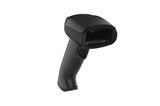
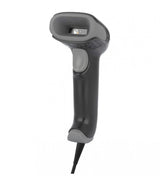
Two corded Honeywell 2D scanners: the Voyager 1470g for everyday tills, the Xenon 1950g for fast, small or damaged codes and rough use.
In this guide
Both are corded Honeywell 2D scanners that plug into USB and type like a keyboard. The Voyager 1470g is the lighter, general-purpose choice for a normal till or desk. The Xenon 1950g is built for heavier work: it has a higher-resolution imager, reads bar codes on fast-moving items much better, survives more drops and adds an IBM RS-485 interface. Our 1950g version has HD (high density) optics for very small codes.
| Xenon 1950g (HD) | Voyager 1470g | |
|---|---|---|
| Imager | 1280 × 800 pixels | 1040 × 720 pixels |
| Motion tolerance, 13 mil UPC | Up to 400 cm/s | 70 cm/s |
| Scan angle (H × V) | 42° × 27° | 39.2° × 27.4° |
| Aimer | Bar | Red dot |
| Read range, 13 mil UPC | 0–368 mm | 18–400 mm |
| Read range, 5 mil Code 39 (small codes) | 14–219 mm | 20–205 mm |
| Read range, 10 mil Data Matrix | 12–211 mm | 10–165 mm |
| Read range, 20 mil QR | 0–331 mm | 5–325 mm |
| Interfaces | USB, keyboard wedge, RS-232, RS-485 (IBM 46xx) | USB, keyboard wedge, RS-232 |
| Feedback | Good-read LEDs, rear-view LEDs, adjustable beeper, optional vibration | Good-read LED, beeper |
| Size (L × W × H) | 104.1 × 71.1 × 160 mm | 82 × 62 × 169 mm |
| Weight | 147 g | 130 g |
| Operating power | 2.5 W | 2 W |
| Drop rating | 50 drops to concrete from 1.8 m | 30 drops to concrete from 1.8 m |
| Tumble rating | 2,000 tumbles of 0.5 m | 1,000 tumbles of 0.5 m |
| Bar codes | 1D, PDF417, 2D, postal, DotCode, Digimarc, OCR (depending on configuration) | Same on the 2D model |
| Sealing | IP52 | IP52 |
| Operating temperature | 0–50 °C | 0–50 °C |
| Honeywell warranty | 5 years | 5 years |
| Cordless sibling | Xenon 1952g | Voyager 1472g |
Figures from Honeywell's Xenon XP 1950g data sheet (HD values) and Voyager XP 1470g data sheet, and the Honeywell product pages. Read ranges are typical and depend on print quality and light.
Choose the Xenon 1950g if
- Items move quickly past the scanner, for example at a busy checkout or packing line
- You scan very small or dense codes, such as small Data Matrix labels on parts or pharmacy packs
- The scanner gets dropped often, or the work is rough
- Your POS uses an IBM RS-485 port
Choose the Voyager 1470g if
- You need a dependable all-rounder for a shop till, office or reception desk
- Staff hold the scanner a lot and a lighter, slimmer handle matters
- Codes are normal retail labels and phone screens, scanned at a steady pace
- USB, keyboard wedge or RS-232 covers your connection
What the numbers mean in practice
Motion tolerance is how fast a bar code can move through the scanner's view and still be read. At up to 400 cm/s against 70 cm/s, the Xenon reads items swept quickly past it without the operator pausing. The higher pixel count helps with damaged, poorly printed and very small codes.
HD optics trade some reach on large codes for closer focus on small ones. Our 1950g reads a standard 13 mil retail bar code up to 368 mm away, where the Voyager reaches 400 mm. For most counter work both distances are more than enough. If you need more reach with a Xenon, Honeywell also makes SR (standard range) versions; our cordless Xenon 1952g kit uses SR optics.
What both scanners share
Both are set up with Honeywell programming bar codes, and the keyboard country names for our markets, such as Estonia, Latvia (QWERTY), Lithuania, Finland, Polish (Programmers) and Czech, are the same in both User Guides. So are the Quick Start Guide suffix codes Add CR Suffix, Add Tab Suffix and Remove Suffix. The Xenon User Guide also documents an ALT Mode for special characters. Both work with Honeywell's EZConfig for Scanning, need no driver in USB keyboard mode and read codes on phone screens.
Our guides cover each family: Xenon setup and Xenon keyboard and suffix, and Voyager setup and Voyager keyboard and suffix. See all guides for the Xenon 1950g and the Voyager 1470g, or compare them in our shop: Xenon 1950g and Voyager 1470g.
Frequently asked questions
Is the Xenon 1950g better than the Voyager 1470g?
For demanding work, yes: Honeywell quotes a higher-resolution imager, much higher motion tolerance and a tougher drop rating. For a normal till, the lighter Voyager 1470g does the job.
What does HD mean on the Xenon 1950g?
High density. The optics focus closer to read very small, dense codes. SR (standard range) versions read standard codes from further away.
Do the Xenon 1950g and Voyager 1470g use the same programming bar codes?
The common ones, such as keyboard country and suffix, have the same names. Use the Quick Start Guide or User Guide for your model, as each covers its own scanner.
Can both read QR codes on phone screens?
Yes. Both 2D scanners read QR codes, including codes on smartphone screens.
Was this guide helpful?
More V1470G guides
V1470G
TroubleshootingHoneywell Voyager 1470g and 1472g troubleshooting: beeps and LEDs10 min · Easy
V1470G
How-toHoneywell Voyager: keyboard country, Enter and Tab suffix5 min · Easy
V1470G
ComparisonHoneywell Voyager 1470g vs 1472g: corded or cordless?5 min · Easy
V1470G
SetupHoneywell Voyager 1470g and 1472g setup: USB, base, Bluetooth15 min · Easy
Still stuck?
Contact support
Send us your model and a short description of the problem. Our team will help you find a solution.