Zebra ZD421 Buyer's Guide: Which Version Do You Actually Need?
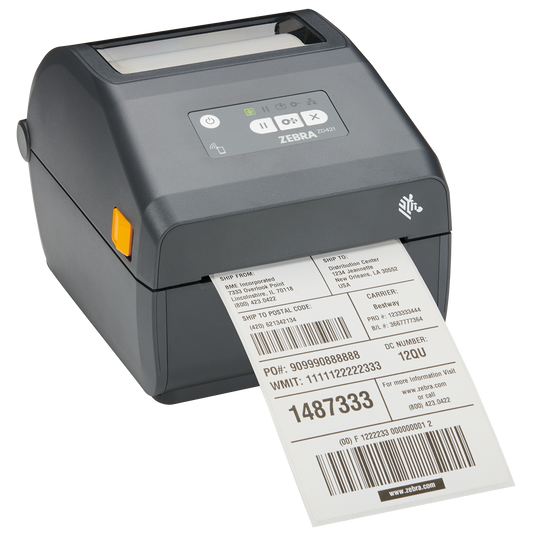
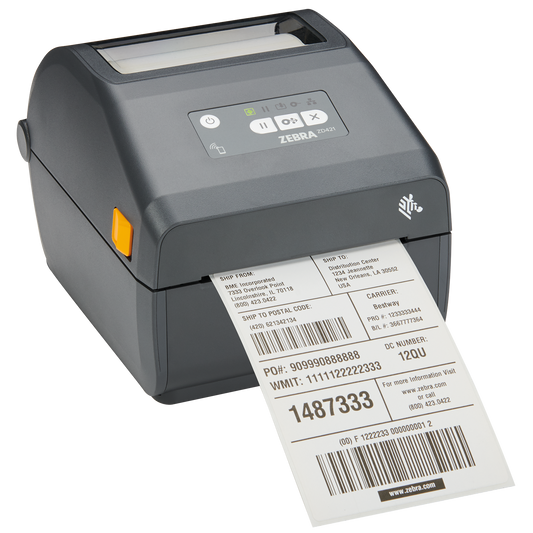
The Zebra ZD421 is one of the most widely deployed desktop label printers in Europe — and one of the most confusing to order. There are three print technologies, two resolutions, a healthcare version and half a dozen connectivity combinations, all hiding behind part numbers like ZD4A042-D0EE00EZ. Order the wrong one and you end up with a printer that can't reach your network, or that needs ribbons you didn't budget for.
Which one to order
If you already know roughly what you need, start here. These six cover the situations most businesses are in, and all are in stock.
| Your situation | Order this |
|---|---|
|
Shipping labels, shared over the network The most common setup — packing bench, several people printing |
ZD421d, 203 dpi, EthernetZD4A042-D0EE00EZ
|
|
Shipping labels, no network cable Packing bench on Wi-Fi, or a printer that moves |
ZD421d, 203 dpi, Wi-FiZD4A042-D0EX02EZ
|
|
Product or asset labels that must last Thermal transfer with a resin or wax-resin ribbon |
ZD421t, 203 dpi, EthernetZD4A042-30EE00EZ
|
|
Small labels with dense codes Electronics, jewellery, laboratory, pharmaceutical |
ZD421t, 300 dpi, EthernetZD4A043-30EE00EZ
|
|
Hospital, pharmacy or laboratory Disinfectant-ready housing, medical-grade power supply |
ZD421-HC, 203 dpi, EthernetZD4AH42-30EE00EZ
|
|
Frequent ribbon changes by several people Cartridge drops in without threading |
ZD421c, 203 dpi, EthernetZD4A042-C0EE00EZ
|
Not sure yet? The rest of this guide explains how to read those part numbers, which version fits which job, and what to check before you order.
What the ZD421 is for
The ZD421 is a 4-inch (104 mm) desktop thermal printer built for medium-volume label printing: shipping labels at a packing bench, product and shelf labels in retail, specimen labels in a laboratory, asset tags in an office. It sits above the entry-level ZD220 and ZD230 and below the ZD621, which adds a display and faster throughput.
It is the model most businesses land on when the entry-level printer isn't fast enough but a full industrial machine is more than they need.
d, t or c — the most important decision
The letter after ZD421 tells you the print technology, and it determines your running costs for the life of the printer.
| Version | How it prints | Consumables | Best for |
|---|---|---|---|
|
ZD421d Direct thermal |
Heats the label directly — no ribbon | Labels only | Shipping labels, warehouse and picking labels, receipts — anything that only has to survive days or weeks |
|
ZD421t Thermal transfer |
Melts ink from a ribbon onto the label | Labels + ribbon rolls | Product labels, asset tags, chemical and outdoor labels — anything that must survive months or years |
|
ZD421c Cartridge |
Thermal transfer using a sealed ribbon cartridge | Labels + ribbon cartridges | Environments where staff change ribbons often and threading a roll wastes time or gets done wrong |
The trap: direct thermal print fades. Heat, sunlight, friction and solvents all darken or erase it. A shipping label that only needs to last a week in transit is fine. A product label that sits on a shelf for two years is not — that needs thermal transfer with the right ribbon.
Why choose the c version? A ribbon cartridge drops in without threading. If several people share the printer and ribbon changes are frequent, the cartridge removes a step where things go wrong. The trade-off is cost per label: cartridges are more expensive than plain ribbon rolls.
How to read a ZD421 part number
Every ZD421 part number follows the same structure. Using ZD4A042-D0EE00EZ as an example:
| Segment | Means | Values you'll see |
|---|---|---|
ZD4 |
ZD400 series | — |
A |
Standard model | A = standard, H = healthcare |
04 |
4-inch print width | — |
2 |
Resolution | 2 = 203 dpi, 3 = 300 dpi |
D |
Print technology | D = direct thermal, 3 = thermal transfer, C = cartridge |
EE / EM / EX / EW |
Connectivity | See the table below |
So ZD4A042-D0EE00EZ is a standard 4-inch, 203 dpi, direct thermal printer with Ethernet — and ZD4AH43-30EE00EZ is a healthcare 300 dpi thermal transfer model with Ethernet.
Connectivity: the part people get wrong
Every ZD421 has USB and Bluetooth as standard. What changes is whether you also get Ethernet or Wi-Fi — and you generally cannot add these later.
| Code | You get | Choose when |
|---|---|---|
| EM | USB + Bluetooth | One computer, one printer, sitting next to each other |
| EE | USB + Bluetooth + Ethernet | Several people print to it, or it lives on the company network — the safest choice for shared use |
| EX / EW | USB + Bluetooth + Wi-Fi | No network cable at the packing bench, or the printer moves between locations |
Decide this before ordering. The single most common regret with the ZD421 is buying a USB-only unit for one workstation, then needing a second person to print to it six months later.
203 or 300 dpi?
Resolution decides how small your text and codes can be before they stop scanning.
- 203 dpi handles shipping labels, warehouse labels, standard barcodes and normal text. This is the right choice for most work, and it prints faster.
- 300 dpi is for small labels with a lot on them — jewellery tags, electronics components, laboratory tubes, pharmaceutical labels, and any 2D code squeezed into a small area.
If your labels are 50 × 25 mm or larger and carry a normal barcode, 203 dpi is enough. If you are fitting a Data Matrix code onto a tube label, choose 300 dpi.
The healthcare version
The ZD421-HC is not simply a white printer. It differs in three ways that matter in a hospital or laboratory:
- Disinfectant-ready plastics that survive daily wipe-downs with alcohol, bleach and quaternary compounds. A standard housing clouds and cracks under the same routine.
- Medical-grade power supply, required for equipment in patient care areas.
- UV-resistant white housing that doesn't yellow under ward lighting.
If the printer will be cleaned with disinfectant more than occasionally, the HC version is the cheaper option over the life of the device.
What to budget beyond the printer
Two costs catch people out:
Ribbons (t and c versions only). Match the ribbon to the label material, not to the printer. Wax ribbon will not bond to a synthetic label — it prints, looks fine, and wipes off with a thumb. Paper labels take wax, coated paper takes wax-resin, and synthetic labels need resin.
Label size and roll diameter. The ZD421 takes rolls up to 127 mm outer diameter with a 25 mm or 38 mm core. A larger roll means fewer changes per shift, but it has to physically fit.
Common questions
Can I convert a ZD421d to thermal transfer later?
No. The print technology is fixed in the hardware. Decide before ordering.
Can I add Ethernet or Wi-Fi afterwards?
Generally no — connectivity is configured at the factory. Order the version you need.
Does the ZD421 work with my courier portal or webshop?
Yes. It accepts standard Windows and Mac drivers, and it also speaks ZPL, so it works with courier portals and e-commerce systems that send ZPL directly. Whether your system sends a PDF through the driver or raw ZPL to the printer, both work.
How is the ZD421 different from the ZD621?
The ZD621 adds a colour display, faster print speed and more onboard memory. If the printer is shared, moved between jobs or used at high volume, the display alone often justifies the difference. For a fixed packing bench, the ZD421 is usually enough.
What about the ZD220 and ZD230?
Those are the entry models — lower duty cycle, fewer connectivity options, no cartridge version. They suit low-volume printing at a single desk.
All ZD421 models are CE certified and covered by Zebra's manufacturer warranty. If none of the six above matches your setup, you can compare every version we stock on the Zebra ZD421 collection page — and matching labels and ribbons are available from stock.
Tags:
Previous
GS1 Sunrise 2027: What Estonian Retailers Need to Know About the 2D Barcode Transition
Next
Barcode Scanner Total Cost of Ownership Over Five Years