Comparison
Zebra ZD611 vs ZD621: 2-inch or 4-inch desktop printer?
Same speed, buttons and options. The 2-inch ZD611 is smaller and lighter; the 4-inch ZD621 takes wide labels, 300 m ribbons and has serial built in.

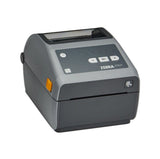
In this guide
The ZD611 and ZD621 are the 2-inch and 4-inch models of Zebra's premium ZD600 series. They print at the same speed and resolution, use the same buttons and lights and share the same options. The real difference is width: the ZD611 prints up to 56 mm wide on labels up to 60 mm, the ZD621 up to 104 mm on labels up to 108 or 118 mm. The ZD611 is narrower and lighter; the ZD621 adds a standard serial port and 300 m ribbons.
| ZD611 | ZD621 | |
|---|---|---|
| Class | 2-inch desktop | 4-inch desktop |
| Versions | ZD611d direct thermal, ZD611t ribbon roll, RFID, linerless and healthcare models | ZD621d direct thermal, ZD621t ribbon roll, ZD621R RFID, linerless and healthcare models |
| Resolution | 203 dpi; 300 dpi optional | Same |
| Max print speed | 203 mm/s (8 ips) at 203 dpi; 152 mm/s (6 ips) at 300 dpi | Same |
| Max print width | 56 mm at 203 dpi; 54 mm at 300 dpi | 104 mm at 203 dpi; 108 mm at 300 dpi |
| Media width | 15–60 mm | 15–108 mm (direct thermal), 15–118 mm (thermal transfer) |
| Media roll | Up to 127 mm diameter; 12.7 or 25.4 mm core, 38.1–76.2 mm with adapters | Same |
| Ribbon (thermal transfer) | 74 m roll, 33–58 mm wide | 74 m or 300 m roll, 33.8–109.2 mm wide |
| Media dancer | ZD611t; not on the ZD611d | Yes |
| Controls | 5 status lights, 3 buttons; 4.3-inch colour touch display listed as standard on the ZD611t and RFID models | 5 status lights, 3 buttons; optional 4.3-inch colour touch display |
| Standard ports | USB 2.0, USB host, Ethernet 10/100, Bluetooth Low Energy for the setup app | USB 2.0, USB host, Ethernet 10/100, RS-232 serial, Bluetooth Low Energy for the setup app |
| Optional connectivity | Wi-Fi 6 (802.11ax) with Bluetooth 5.3, or Wi-Fi 5 (802.11ac) with Bluetooth 4.2; serial module | Same wireless options |
| Options | Dispenser, cutter, 2750 mAh battery | Same |
| Memory | 512 MB flash, 256 MB SDRAM | Same |
| Size and weight, direct thermal (L × W × H) | 220 × 115 × 151 mm, 1.07 kg | 221 × 177 × 151 mm, 1.6 kg |
| Size and weight, thermal transfer (L × W × H) | 242.9 × 138.7 × 169.2 mm, 1.63 kg | 267 × 202 × 192 mm, 2.5 kg |
| Operating temperature | 4.4–41 °C | Same |
Figures from Zebra's ZD600 Series spec sheet; speeds are maximums. Zebra's ZD611D user guide lists Ethernet and Bluetooth Low Energy as options rather than standard, so check the configuration of a specific model on its product page.
Choose the ZD611 if
- Your labels are 60 mm wide or narrower: price and shelf labels, small product or food labels, receipts, tags
- Desk or counter space is tight; the ZD611d is 115 mm wide against 177 mm
- You print with ribbon and want the colour touch display Zebra lists as standard on the ZD611t
Choose the ZD621 if
- You print labels wider than 60 mm, such as 100 × 150 mm shipping labels
- You need a serial port out of the box
- You print on ribbon in volume and want 300 m rolls, which last four label rolls each
- One printer must handle both narrow and wide labels
What both printers share
Both belong to the same ZD600 platform and work the same way at the printer. Labels load between the roll holders and under the media guides, with a movable sensor for gap and black-mark labels. SmartCal is PAUSE + CANCEL for 2 seconds and the configuration report FEED + CANCEL. The five status lights have the same meanings, both run ZPL and EPL, and both take the same kinds of options: dispenser, cutter, battery and Wi-Fi with Bluetooth.
Both can ship with Zebra's extra EU security when bought in Europe from 1 August 2025. Affected models then need a Protected Mode password during setup, as explained in our ZD611 setup guide and ZD621 setup guide.
Where they really differ
Label width
This decides it. Anything wider than 60 mm, from 4-inch shipping labels to wide product labels, needs the ZD621. A ZD621 also prints narrow labels, but needs more desk space.
Ribbon and display
The ZD611t takes 74 m ribbon rolls only; the ZD621t takes 74 m or 300 m rolls, so you change ribbons far less often. On the ZD611, Zebra's spec sheet lists the colour touch display as standard on the thermal transfer and RFID models. On the ZD621 the display is optional.
Compare the models in our shop: ZD611d and ZD621d. More guides: ZD611 and ZD621.
Frequently asked questions
Can the Zebra ZD611 print 100 × 150 mm shipping labels?
No. The ZD611 takes labels up to 60 mm wide. For 100 × 150 mm labels, choose a 4-inch printer such as the ZD621.
Is the ZD621 faster than the ZD611?
No. Both print up to 203 mm/s at 203 dpi and 152 mm/s at 300 dpi.
Do the ZD611t and ZD621t use the same ribbons?
No. The ZD611t takes 74 m ribbons 33–58 mm wide. The ZD621t takes 74 m or 300 m ribbons up to 109.2 mm wide.
Does the ZD611 have Ethernet?
Zebra's spec sheet lists Ethernet as standard on every ZD611, but the ZD611D user guide calls it an option, so look for the RJ-45 socket. Serial is an add-on module; the ZD621 has it built in.
Was this guide helpful?
More ZD611 guides
Related guides
Still stuck?
Contact support
Send us your model and a short description of the problem. Our team will help you find a solution.